Should You Buy the Envy X360 15 2023 in 2026? A Deep Dive
Introduction — why I wrote this
I've been using the HP Envy x360 15 (2023 model) as my daily driver for about 18 months, and in that time I've taken it on the commute, used it as my primary work-from-home machine, edited a handful of videos, and leaned on it for entertainment and light gaming. By 2026 there are many newer laptops on the market, so I wanted to write an honest, first-person assessment of whether this 2023 convertible still makes sense to buy (used or new-old-stock) and for whom. What follows is my hands-on experience, specific strengths and shortcomings I noticed over months of use, a quick comparison to typical 2026 alternatives, and a practical buying guide if you're considering one now.
What I bought (my unit and configuration)
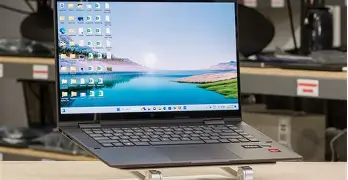
When I purchased the Envy x360 15, I chose a mid-to-high configuration that matched my needs at the time: a 15.6-inch FHD touch display, an 8-core Ryzen processor (U-series), 16 GB of RAM, and a 512 GB NVMe SSD. The chassis was the darker brushed-metal finish, and I opted for the finger-print reader and backlit keyboard. I deliberately did not get the OLED option because I wanted better battery life and a matte-like finish to reduce reflections.
Daily use and build quality
In my experience the Envy x360 15 is one of the better-built midrange convertibles I’ve used. The hinge feels sturdy — not as rock-solid as business-grade ThinkPads, but thick and confidence-inspiring for a 2-in-1. The lid and keyboard deck are aluminum-magnesium alloy; after a year and a half of travel there are tiny wear marks but no structural flex in the lid or deck that worries me.
The keyboard surprised me. The key travel is moderate and the layout is comfortable for long typing sessions; I write daily and rarely felt fatigued. The trackpad is large, precise, and palm-rejection works well. My unit includes a fingerprint reader integrated into the deck and an IR camera option for facial unlock; I preferred fingerprint because the IR camera was flickery in dim lighting.
Display: good, with realistic caveats
My 15.6" FHD panel is bright enough for indoor work and most coffee shop environments. Colors are pleasant for photo browsing and casual editing, but it’s not a professional-caliber panel. I noticed a little backlight bleed at the bottom edge during very dark scenes in movies — nothing that ruined anything, but visible in a dark room.
If you value deep contrast and richer colors, some 2023 SKUs offered OLED; those are more vivid but can trade off battery life and are more reflective. In my experience the FHD IPS-like panel gives a better practical balance of battery life and daylight usability.
Performance: plenty for productivity, modest for heavy content work
What I found was that day-to-day performance is snappy. Web browsing with dozens of tabs, Slack, multiple browser windows, streaming music, and light spreadsheet work all felt instantaneous. The Ryzen U-series chip in my unit handles multitasking easily and wakes instantly from sleep.
When I pushed it — exporting a 20-minute 1080p video, running local Docker containers, or compiling medium-size codebases — the laptop handled the jobs but ran warm and sometimes hit thermal limits. I could feel the underside getting hot and the fans would ramp up noticeably. For occasional content creation and editing it's fine; for frequent heavy-duty tasks you'd want a machine with a higher-TDP chip or dedicated cooling.
Battery life: realistic expectations
In my typical mixed usage (web, email, occasional streaming, and light editing), I averaged around 7 to 9 hours of real-world battery life. That meant I could leave home with a full charge and get through a workday if I was conservative. When doing video editing or gaming, battery life dropped to 2–3 hours. If you do a lot of portable heavy work, you'll likely be tethered to a charger more often than not.
Fast charging works well — topping from 10% to around 50% in 30 minutes — which is really useful when you're between meetings. Over the 18 months I noticed battery capacity drop slightly (a natural aging effect) but it has remained usable for a full day of light tasks.
Find top-rated Electronics products at great prices.
View Offers →Thermals and noise
One thing that bothered me at times was the fan noise under sustained load. The design tunes for comfort, but when fans run at higher RPM you can definitely hear them in quiet rooms. Thermal throttling occurs under long, heavy workloads; performance is fine for short bursts but not for prolonged CPU/GPU stress. If you care about a perfectly quiet machine while rendering, this isn't the ideal choice.
Speakers, webcam, and other day-to-day features
The speakers punch above their weight for conference calls and casual media. They are clear and produce decent mids; don't expect deep bass. For video calls, the webcam is serviceable, but it's not spectacular — skin tones can wash out in mixed lighting. The privacy shutter is a small but appreciated feature that I use daily.
Ports are practical: USB-A ports for legacy devices, at least one USB-C (which doubles for charging), and a full-size HDMI connector on my unit. There's a microSD card slot in the configuration I bought, which I used often for quick photo transfers. I like that HP included a proper HDMI port — it saves a dongle for presentations.
Software and updates
My Envy shipped with Windows and some HP utilities. HP's software bundle includes things like system diagnostics, audio tuning, and display presets. I removed several of the preinstalled trial apps and tuned the startup programs — after that the system felt cleaner. HP provided firmware and driver updates during my ownership; major Windows updates have been okay, but occasionally an HP-specific driver needed updating after a Windows feature update.
Durability and long-term ownership
After 18 months of daily use I haven't had hardware failures. The hinge shows no looseness, the keyboard legends are intact, and the SSD has plenty of life left. If you plan to keep the laptop for many years, consider upgrading the SSD when you buy (if the model allows easy access) — that can be the easiest upgrade to keep the machine feeling fast as software gets heavier.
Pros & Cons
- Pros: Solid build and hinge for a convertible; comfortable keyboard and large, accurate trackpad; practical port selection (including HDMI); snappy everyday performance; good battery life for balanced configurations; useful privacy features (fingerprint, shutter).
- Cons: Gets warm and noisy under prolonged heavy loads; display quality varies by SKU (OLED options trade off battery); webcam and speaker are okay but not best-in-class; not the best choice for sustained content creation or modern AAA gaming in 2026.
Quick comparison — Envy x360 15 (2023) vs 2026 alternatives
| Model | Target use | Performance | Battery (real-world) | Portability | 2026 value |
|---|---|---|---|---|---|
| Envy x360 15 (2023, my unit) | Everyday productivity, light content creation, convertible flexibility | Good for daily apps; modest for heavy editing | 7–9 hrs mixed use | Reasonable for a 15.6" convertible (moderate weight) | Good value if priced used or discounted; feature-rich |
| Modern 2026 Ultrabook (thin-and-light) | Ultra-portable productivity, long battery life | Often faster single-thread; better efficiency | 10–18 hrs typical | Much lighter and thinner | Better for travelers and battery-focused buyers |
| Creator laptop (2024–2026) | Frequent video/photo editing, render tasks | Higher sustained performance with better cooling | 4–7 hrs under heavy load | Heavier; less portable | Better choice for pros who render often |
Who should consider buying the Envy x360 15 in 2026?
In my experience, this machine still makes sense for a few types of buyers in 2026:
- Someone who values a convertible design and a full-size 15.6" screen for productivity but doesn't need workstation-level performance.
- Buyers looking for a balanced laptop for daily work, media consumption, and occasional light content creation.
- Anyone who finds a well-priced used or refurbished unit — for the money it can out-feature some cheaper new options.
Conversely, avoid it if you need long, sustained performance for video encoding, 3D workloads, or if you want the absolute lightest, longest-lasting ultrabook available in 2026.
Buying guide — what to look for (practical tips from my experience)
If you're considering an Envy x360 15 (2023 SKU), here are practical criteria I used and recommend you check before buying:
1) Confirm the exact configuration
Envy x360 models had multiple CPU, display, and storage variants. I personally prioritized 16 GB RAM and at least a 512 GB NVMe SSD. If you plan to keep a laptop for several years, the extra RAM helps with longevity. If the model is user-upgradable, check whether RAM is soldered or whether storage is replaceable.
Find top-rated Electronics products at great prices.
View Offers →2) Preferred display type
Decide if you want the OLED (if available) for superior contrast and color, or the FHD IPS-like panel for better battery life and lower reflectiveness. I chose FHD and found it a better fit for my use-case.
3) Port checklist
Make sure the unit has the ports you need: I look for at least one USB-C that supports charging, a full-size HDMI if you plan to connect to external displays, and at least one USB-A. If you rely on microSD or a headphone jack, confirm those are present — some SKUs removed them.
4) Battery health (for used buys)
When buying used, check battery wear level in Windows power settings or via the vendor's health report. A replacement battery is a cost to factor in if wear is high.
5) Thermals and fan behavior
Try to reproduce sustained tasks in a store or ask for a short video if buying online: export a short video or run a CPU load and listen for high fan noise or thermal throttling. If silence at idle and manageable fan noise under load matters to you, this check is important.
6) Warranty and serviceability
See if the seller still offers warranty coverage or an extended warranty. Also check how easy it is to open the bottom panel; being able to swap the SSD later prolonged my unit's usefulness.
7) Price vs alternatives
In 2026 the biggest question is value. If you can get a clean used Envy x360 15 at a significant discount compared to new 2026 ultrabooks, it’s a reasonable buy. If the price approaches that of newer thin-and-light machines with better efficiency and slightly better sustained performance, I’d usually pick the newer option.
Real-world tips I learned while owning one
- I set Windows power plans to "balanced" and tuned the fan curve in HP's BIOS tools to avoid aggressive fan behavior during light tasks — it made daily use more pleasant.
- Installing the SSD health tool and checking SMART attributes every few months helped me catch a slight increase in reallocated sectors early and back up before things got worse.
- If you do a lot of video calls, invest in a small external USB-C webcam — the laptop’s built-in one is fine, but an external one improved color and low-light performance significantly for me.
- Consider a USB-C dock if you plan to use the laptop at a desk — the built-in HDMI is great for occasional displays, but a dock simplifies the switch between desk and travel use.
Conclusion — my final take
After 18 months of real-world use, I can say the Envy x360 15 (2023) is still a compelling machine in 2026 for the right buyer. I appreciated the sturdy convertible chassis, comfortable keyboard, practical port selection, and balanced day-to-day performance. What I found limiting were the thermal behavior under sustained heavy loads and the variability of display quality between SKUs. If your work is general productivity, content consumption, and occasional editing, and you can find a well-priced unit, it remains a smart value proposition.
However, if you need the most efficient battery life, whisper-quiet fan behavior during intensive tasks, or workstation-class sustained performance, I'd look at newer 2025–2026 ultraportables or creator laptops instead. In my experience, the Envy has lived up to its promise as a do-it-all convertible — but like any compromise design, it's best matched to users who prioritize versatility over maximum sustained horsepower.