A Professional's Take on the New Thinkpad P15 Gen 2 2021
In the high-stakes world of professional computing, the term "workstation" carries a weight that a standard consumer laptop simply cannot support. For architects, data scientists, software engineers, and 3D animators, a computer is not just a tool for communication; it is a thermal-managed engine of productivity. When Lenovo announced the ThinkPad P15 Gen 2 in 2021, it signaled a refinement of their flagship mobile workstation philosophy. Replacing the original P15 and the long-standing P53 lineage before it, the Gen 2 arrived during a unique period where remote work and hybrid professional environments demanded desktop-class power in a transportable form factor. This analysis explores whether the P15 Gen 2 holds its ground as a premier choice for professionals who refuse to compromise on performance, modularity, or reliability.
The Engineering Philosophy of the P15 Series
The ThinkPad P15 Gen 2 is unapologetically thick and heavy. In an era where many manufacturers are chasing the "thin and light" workstation aesthetic, Lenovo has doubled down on a chassis designed for maximum thermal headroom and user serviceability. Professionals who work with complex CAD models or long-render video sequences know that thinness is often the enemy of sustained performance. Heat is the ultimate bottleneck in mobile computing; when a machine cannot dissipate energy efficiently, the clock speeds drop, and the professional’s time is wasted. The P15 Gen 2 addresses this by utilizing a chassis that allows for larger fans, thicker heat pipes, and a magnesium-reinforced internal roll cage that protects the sensitive components during travel.
Beyond its physical stature, the Gen 2 update focused on integrating the latest silicon from Intel’s 11th Generation Tiger Lake H-series processors and NVIDIA’s Ampere-based RTX professional graphics cards. This combination brought significant leaps in IPC (instructions per cycle) performance and ray-tracing capabilities compared to the previous generation. For the professional buyer, this means a machine that doesn't just open files faster, but one that can handle real-time visualization of architectural projects or the training of local machine learning models with significantly reduced latency.
Performance Architecture: CPU and GPU Deep Dive
At the heart of the P15 Gen 2 is a selection of Intel Core and Xeon processors. The move to the 11th Gen architecture was pivotal because it introduced PCIe Gen 4 support. This is a critical detail for professionals working with massive datasets or high-resolution video; PCIe Gen 4 speeds effectively double the bandwidth for NVMe storage, allowing for sequential read speeds that can exceed 7,000 MB/s. In a real-world scenario, a video editor working with 8K RAW footage will notice the difference in timeline scrubbing and asset loading, where the storage bottleneck is often more frustrating than the CPU itself.
The graphics department is where the P15 Gen 2 truly separates itself from the thinner P15v or the P1 Gen 4. It supports up to the NVIDIA RTX A5000 with 16GB of VRAM. Unlike consumer cards, these professional-grade GPUs are equipped with ISV (Independent Software Vendor) certifications. This ensures that software like SolidWorks, Autodesk Revit, and Siemens NX will run with maximum stability and specialized driver optimizations. The 16GB of video memory is particularly vital for data scientists working with large GPU-accelerated tensors or 3D artists working with complex textures and lighting environments that would otherwise overflow a standard 8GB buffer.
Thermal Performance and Sustained Loading
One of the most impressive aspects of the P15 Gen 2 is its thermal management system. Lenovo employs a "duckbill" fan design and a massive vapor chamber in higher-end configurations to keep the CPU and GPU from throttling. During intensive benchmarks or long rendering sessions, the machine maintains a consistent power draw. While the fans are certainly audible under load, the pitch is a lower-frequency "woosh" rather than a high-pitched whine, which is less distracting in a quiet office environment. The keyboard deck remains impressively cool even when the internals are reaching high temperatures, a testament to the effective isolation of the heat-generating components from the user touchpoints.
Display Options and Visual Accuracy
Professionals in visual arts and engineering require more than just high resolution; they require color accuracy and contrast. The P15 Gen 2 offers several display tiers, ranging from a standard Full HD 300-nit panel to a stunning 4K OLED touch display. For most professional users, the 4K IPS panel with 600 nits of brightness and 100% Adobe RGB coverage is the "sweet spot." It provides the brightness necessary to work near windows while offering the color gamut required for print-accurate design work. The inclusion of Factory Color Calibration (X-Rite Pantone) means that the laptop arrives ready for professional work right out of the box, reducing the need for immediate manual calibration.
Input, Connectivity, and User Experience
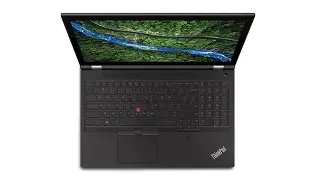
The ThinkPad keyboard remains the industry standard, and the P15 Gen 2 features the classic 1.8mm travel distance that many modern laptops have sacrificed. For developers and writers, the tactile feedback and slightly curved keycaps provide a fatigue-free typing experience. The dedicated numpad is a welcome inclusion for data entry professionals, accountants, and engineers who frequently input coordinates or financial figures.
Shop the latest Electronics picks on Amazon.
View Offers →Connectivity is perhaps the strongest suit of this workstation. It functions as a mobile hub, featuring:
- Two Thunderbolt 4 ports for high-speed docking and external GPU support.
- USB-A 3.2 Gen 1 ports for legacy peripherals.
- HDMI 2.1 for 4K/120Hz or 8K/60Hz external display output.
- Dedicated SD Express 7.0 card reader, which is a massive boon for photographers and videographers needing to offload high-bitrate footage.
- A 2.5Gb Ethernet port for ultra-fast wired networking, which is increasingly rare in laptops but essential for moving large files across a local server.
Real-World Professional Use Cases
The Architectural Workflow
In architecture, the workflow often transitions from conceptual 2D drafting in AutoCAD to complex 3D modeling in Rhino or Revit, and finally to photorealistic rendering in V-Ray or Lumion. The P15 Gen 2 handles these transitions seamlessly. The high single-core clock speeds of the Core i9 or Xeon processors ensure that the CAD software remains snappy during the drafting phase, while the RTX A-series GPU takes over during the rendering phase. Having 128GB of RAM capacity across four slots allows architects to keep multiple massive projects open simultaneously without the system swapping to the disk.
Data Science and AI Development
Data scientists often require a "sandbox" environment to test models before deploying them to a cloud-based cluster. With the P15 Gen 2, one can run Docker containers, virtual machines, and local Jupyter notebooks with ease. The support for ECC (Error Correcting Code) memory on Xeon configurations is a critical feature here, as it prevents silent data corruption during long-running scientific simulations or training jobs. The ability to utilize the GPU's CUDA cores for local model inference provides a significant speedup over CPU-only testing.
Software Engineering and Virtualization
For software engineers, especially those working in DevOps or backend infrastructure, the P15 Gen 2 is a mobile server. The ability to house three M.2 NVMe SSDs means a developer can have separate physical drives for Windows, Linux (via dual-boot), and a dedicated drive for high-speed VM storage. Compiling large codebases like the Android Open Source Project or Chromium is significantly faster on the 8-core, 16-thread processors found in this machine.
Comprehensive Comparison: P15 Gen 2 vs. Competitors
To understand where the P15 Gen 2 sits in the market, it is helpful to compare it to other machines available during its release cycle. The primary competitors are the Dell Precision 7560 and the HP ZBook Fury 15 G8.
| Feature | Lenovo ThinkPad P15 Gen 2 | Dell Precision 7560 | HP ZBook Fury 15 G8 |
|---|---|---|---|
| Max CPU | Intel Xeon W-11955M / Core i9 | Intel Xeon W-11955M / Core i9 | Intel Xeon W-11955M / Core i9 |
| Max GPU | NVIDIA RTX A5000 (16GB) | NVIDIA RTX A5000 (16GB) | NVIDIA RTX A5000 (16GB) |
| RAM Slots | 4x SO-DIMM (Up to 128GB) | 4x SO-DIMM (Up to 128GB) | 4x SO-DIMM (Up to 128GB) |
| Storage Slots | 3x M.2 NVMe (PCIe Gen 4) | 3x M.2 NVMe (PCIe Gen 4) | 4x M.2 NVMe or mixed 2.5" |
| Keyboard | 1.8mm travel, Numpad | 1.6mm travel, Numpad | 1.5mm travel, Numpad |
| Weight | Starting at 6.32 lbs (2.87 kg) | Starting at 5.42 lbs (2.45 kg) | Starting at 5.18 lbs (2.35 kg) |
While the specifications across the "big three" are similar, the P15 Gen 2 distinguishes itself with its keyboard quality and its thermal consistency. Dell and HP offer slightly lighter chassis, but the ThinkPad’s robustness and the ease with which a user can access the internals for upgrades make it a favorite for IT departments and power users who intend to keep the machine for five or more years.
Pros and Cons: A Balanced View
Every piece of technology involves trade-offs. The P15 Gen 2 is a masterpiece of specialized engineering, but it is not the right tool for everyone. Below is a breakdown of its strengths and weaknesses from a professional's perspective.
Pros
- Exceptional Build Quality: The MIL-STD 810H certification ensures the machine can withstand vibrations, shocks, and temperature extremes.
- Unrivaled Upgradeability: Four RAM slots and three M.2 slots are easily accessible, making it future-proof for the next several years of software bloat.
- Industry-Leading Keyboard: The typing experience is superior to almost any other laptop on the market, facilitating long hours of coding or documentation.
- ISV Certified Graphics: Guaranteed stability for mission-critical professional software.
- Comprehensive I/O: No need for "dongle life"; the machine has every port a professional is likely to need in the field.
- Modular GPU Performance: The GPU is on a daughterboard (MXM-style), which improves cooling and theoretically allows for specialized repairs.
Cons
- Weight and Bulk: At over 6 pounds and featuring a large power brick, this is not a laptop for "coffee shop" working; it is a desk-to-desk machine.
- Battery Life: Even with a 94Wh battery, the power-hungry components mean you can expect only 3-5 hours of light professional work away from the wall.
- Webcam Quality: At 720p, the webcam is functional but disappointing for a premium machine in an age of constant video conferencing.
- Touchpad Size: The touchpad is slightly smaller than those found on modern consumer laptops to accommodate the physical TrackPoint buttons.
Buying Guide: Configuring the P15 Gen 2
When purchasing a P15 Gen 2 on the secondary or refurbished market, or if finding remaining new stock, the configuration choice is critical. Because of its modular nature, you can often save money by opting for lower RAM and storage and upgrading them yourself later.
Shop the latest Electronics picks on Amazon.
Browse Now →The "Value" Professional Configuration
For those doing standard engineering or development work, an 11th Gen Core i7, 16GB or 32GB of RAM, and the NVIDIA RTX A2000 graphics card provide excellent value. This setup stays cool, handles most multitasking with ease, and provides the essential ThinkPad reliability without the staggering price tag of the top-tier components.
The "Power" User Configuration
For heavy 3D rendering or data science, the Core i9 or Xeon processor is a must. Pairing this with the NVIDIA RTX A4000 or A5000 is necessary to unlock the 8GB-16GB VRAM buffers. Additionally, opting for the 4K IPS 600-nit screen ensures that you are seeing your work in the best possible light. If you choose the Xeon processor, ensure you also purchase ECC RAM to take full advantage of the platform's stability features.
A Note on Storage
Since the machine supports three M.2 drives, a popular strategy is to use a 512GB Gen 4 drive as the boot disk for the OS and applications, and then add a high-capacity (2TB or 4TB) Gen 3 or Gen 4 drive in the second slot for active projects and scratch space. This keeps the primary drive clean and fast while providing ample room for assets.
Longevity and Sustainability
In a world of "disposable" electronics, the ThinkPad P15 Gen 2 stands out as a more sustainable choice due to its repairability. Lenovo provides detailed Hardware Maintenance Manuals online, and every part is assigned a FRU (Field Replacement Unit) number. If a fan fails or a keyboard wears out after three years of heavy use, the professional can replace that specific part with just a screwdriver, rather than replacing the entire computer. This modularity not only saves money in the long run but also reduces the environmental impact of electronic waste.
Furthermore, the magnesium roll cage and glass-fiber reinforced plastic (GFRP) chassis ensure that the machine can survive the rigors of travel and construction site visits. Many P-series machines remain in active service for a decade, often being repurposed as home servers or secondary workstations after their primary professional life has ended.
Conclusion
The ThinkPad P15 Gen 2 (2021) represents the pinnacle of the traditional mobile workstation. It does not try to be slim, it does not try to be "trendy," and it certainly doesn't try to hide its industrial roots. Instead, it offers a level of raw performance, thermal reliability, and connectivity that is increasingly hard to find in the modern landscape. For the professional whose income depends on the speed and stability of their computer, the P15 Gen 2 is less of an expense and more of a strategic investment. While its weight and battery life limit its portability, its ability to function as a desktop replacement that you can throw in a backpack makes it a formidable tool for those who do the world's most demanding digital work. Whether you are calculating stress loads on a new bridge, rendering a cinematic sequence, or analyzing millions of data points, the P15 Gen 2 remains a gold standard in professional mobile computing.